Friday, 27 May 2016

10 tips for shooting better video on Android


      With 4K video capabilities starting to appear in more and more Android phones like the Sony Xperia Z2, Samsung Galaxy S5 and LG G3, shooting video rather than just photos on your smartphone has started looking more attractive. What's even more attractive is videos that are shot well. Today we'll share ten simple tips for shooting better quality video on Android.
video smartphone 10 tipps teaser
Shooting better video on Android is easy.

1. CLEAN THE LENS

It sounds ridiculous, but you'd never take photos on your DSLR with the amount of dirt and fat found on the average smartphone camera lens. If you don't have a lens or glasses cleaning cloth handy, just use your shirt.

2. DON'T COVER THE MICROPHONE

Again, know your smartphone like you know your video camera. Pay attention to where the microphone is and make sure you're not covering it up when you shoot video. There's nothing worse than getting that great video of an alien landing only to muffle their intergalactic greeting with your chubby paws.

3. USE BOTH HANDS

Two hands are better than one in many parts of life, and shooting nice smooth and stable video with your smartphone is one of them. Nothing makes a video look worse than awkward jerks and jumps that could have easily been avoided if you simply got grabby with your camera.

4. KEEP IT HORIZONTAL

For starters, never shoot vertical video. Once you're in landscape orientation try to find a horizontal line and keep it level in the frame. Use the horizon or the line of a building as a reference (if you're facing it front on), or otherwise try to maintain a level angle. There's nothing worse than making people seasick when you show them your festival videos.
samsung galaxy s5 mini camera 3
It doesn't take a genius to recognize this doesn't make for good videos. © ANDROIDPIT

5. WATCH OUT FOR HIGH CONTRAST AREAS

Be careful when you have areas of super bright sunlight or artificial illumination and dark shadowy areas. Your smartphone will have issues balancing out these areas and you'll be left with blown out lights and inky blacks with no definition. Try to position yourself somewhere it won't be so contrasty.

6. CHARGE YOUR BATTERY

Shooting video, especially 4K video, consumes a lot of battery life, so before you set out to capture some unforgettable moments make sure you have enough battery power to actually record them. If you have a removable battery take that with you or a external battery pack.
low memory teaser
Low storage space is no friend of shooting video on Android.© AndroidPIT

7. CLEAR UP SOME MEMORY

4K video also fills up memory extremely quickly. If you have a microSD card slot in your phone make sure you're recording your video to it, and if you don't then try to free up as much internal memory as possible before you start shooting. Running out of storage at the critical moment is not an option!

8. AVOID MOVING FROM DARK TO LIGHT AREAS

Like the contrast issue above, if you're tracking a subject from a dark to a light area you'll get some crazy white balance when the subject crosses from shadows to light. The same goes if you're moving from light areas to dark or vice versa.
comment filmer meilleures videos E
Digital zoom sucks, so use your feet to approach your subject. But keep it steady. © ANDROIDPIT

9. DON'T USE DIGITAL ZOOM

Digital zoom sucks, we all know it. So instead of messing up your beautifully framed shot, use your feet to zoom instead. Just keep your phone as still as possible and slowly approach your subject. This may take a little while to perfect but it sure beats crappy digital zooming.

10. BE FLUID WITH YOUR MOVEMENTS

Try to find a nice rhythm to your movements so you maintain a constant speed when panning. Try not to jerkily tilt up or down and avoid changing the speed of your movements. This is jarring in the final video. Try to find a slow, fluid and constant motion. Your videos will look heaps better if you do.

6 Ways to Make Money Online with Facebook

 you’re wondering how you can monetise Facebook, then here are some ideas for you -
1. Find new business clients. Whether you’re a consultant, a writer, a photographer, an illustrator, or any other kind of freelance or online business worker, you can find new clients using this popular social networking site. Read more about finding clients on different sites.
2. Use various apps that enable you to make money. Some examples include:MarketLodge or TwitCash. You might also want to include apps by other money making ventures like Tradebit. Check some services or affiliate programmes and see if they have a Facebook app that you can use.
3. Use Facebook’s Marketplace. The Marketplace offers you ways to sell your stuff – either old or new. You can even look for jobs.
4. Advertise your business or service using Facebook’s Classified Ads. Although you’re not allowed to advertise your business or service in the Marketplace, you can still advertise them using their Facebook’s ad service.
5. Promote links to your blogs or website. This way, you can attract people to whatever you’re selling or promoting on your blog or site.
6. Be a Facebook App Developer. If you have skills in developing online applications (like those popular apps like Warbook, SuperPoke, Graffiti, etc), you might want to consider promoting your services to individuals or companies who might want their own Facebook app.
So, how do you use Facebook? Do you try to make money online through this social networking site?

How Do Freecharge and PayTM Make Money? / Online Recharge offers from Mobikwik, Paytm, Freecharge

The primary revenue source is commissions from Telcos which ranges from 2%(for large & Established operators) to as high as 5% (for new & small operators). This again depends on whether you are directly connected to the Telco's recharge platform or are using an Aggregator (like Oxigen, Euronet, Cyberplat). The margins would be lower in case of the latter.


Since the large operators contribute to the bulk of the txn volume, the average commission earned per txn would typically be in the 2.5-3% range.

 The average payment gateway charges are typically in the 1.8-2% range (will be lower now after the recent 1% cap on debit card MDR by RBI).

The net revenue per txn would therefore be around 0.5-1%. And that's the revenue (not profit) a recharge site makes.

Click Here to Download PayTM


Contrary to media reports, Paytm says Uber customers' money in its e-wallets can be refunded

The rape by driver incident in Delhi has brought a lot of bad publicity for Uber. As if this is not enough, media is now seen as lambasting Paytm, the partner of Uber for e-wallet service, as well. .
  
In an article, Business Standard, wrote that "Uber's Paytm customers can't withdraw money from e-wallet". It says, "Typically, mobile wallets give customers the option of transferring money back to their bank accounts. But, this facility is provided only by those wallets registered with the immediate payment service (IMPS), a clearing and settlement system. At present, eight mobile wallets are registered with IMPS; Paytm is not one among these. Worse, wallet-to-wallet transfers among companies is prohibited by the Reserve Bank of India (RBI). This means, you cannot transfer money, for instance, from Paytm to Vodafone’s m-pesa, or from Paytm to any other mobile wallet provider. So, Uber customers with money in their Paytm accounts have no choice other than availing of other Paytm services, such as utility bill payments or online shopping, to use the amount."
However, Paytm has clarified that money of all customers of Uber, who using the e-wallet can be refunded. On its blog, Paytm, said, “Seems like there is some confusion.
Yesterday’s published article by Business Standard is wrong and misleading. Uber’s customers with a Paytm Wallet can withdraw their money from the e-wallet.”
Vijay Shekhar Sharma, chief executive of Paytm, has said that Uber consumers' wallets were not close looped or blocked. "I am committing on the wallet balance of consumers.
Your money is safe and secure whether Uber exists or not. Uber is just a merchant for us," Sharma said.
  
It is true that e-wallet like Paytm does not allow direct transfer of money from the wallet to the source, like bank account, except in case of refunds from merchants. Paytm says, "You can only transfer money if it has been refunded to your Paytm Wallet. If you have added the money to your Paytm Wallet then that money cannot be transferred to your bank account/ credit card. For transferring the money back to the source, you can click on the Refund tab against that failed order from your Paytm Wallet. It will take 3-21 days for the money to show in your bank account depending on your Bank’s policy."
  
“Paytm is an RBI licensed Wallet and the users’ money is protected under an escrow account with a National Bank. This means that their money is 100% safe,” the company added.
  
A digital wallet or e-wallet refers to an electronic device that allows an individual to make electronic commerce transactions. This can include purchasing items on-line with a computer or using a smartphone to purchase something at a store. Increasingly, digital wallets are being made not just for basic financial transactions but to also authenticate the holder's credentials, says Wikipedia.

Use Android Phone as Web Server and Host A Website On It (App)


Use Android Phone as Web Server and Host A Website On It
                                      
                               We all know with android mobile ,we can do everything what we want.  What about creating a web hosting server, this is perfect you can create your android as a web hosting server. In PC we create web server with the assist of XAMPP and WAMP. Now in android operating system we use a KSWEB App. So here is 2nd trick from Top 8 Android Tips And Tricks 2015. Keep reading this article to get more fun with your android mobile phone.

Disable Others Connection on Public Wifi Android app


Disable Others Connection on Public Wifi Using WifiKill Pro

         All Open public WiFi User experience slow Online speed in computer and Android Cell phone. So How can you improve your Internet speed by avoiding other devices connection. This is one of the most well-known Android Tips And Tricks 2015. With this android technique you can quickly kill other people wifi connection. WiFi Kill pro is android hacking application.

Mobikwik Refer And Earn: Get Rs.20 On Signup + Rs.10 Per Refer

Mobikwik Refer And Earn: One name that is well known in the field of mobile recharges and now as a payment gateway has come up with a super refer and earn program in which you will get Rs.10 Mobikwik cash per refer & Your friend will get Rs.20 as Signup Bonus. You can earn up to Rs.500 Mobikwik cash by referring. This a limited period offer, so hurry up & enjoy this new Mobikwik Refer And Earn offer !!
mobikwik refer and earn

Mobikwik Refer And Earn:

1). Download & Install Mobikwik App to get Rs.20 Signup Bonus: Click Here.
2). Now Open App & Sign up for your Mobikwik account & verify your account.
3). Want to use the same device for multiple registrations? Then goto Accounts section of your device & Add new Gmail account then sign up on Mobikwik.
4).After successful signup, You can see Rs.20 in your Mobikwik Wallet.
5). Now Refer your friends & earn more Mobikwik Money.
6). You will get Rs.10 per referral & your friend will get Rs.20.
7). You can earn Maximum Rs.500 Mobikwik Cash by referring your friends.
8). Cashback will be processed within 24 hours.
9). Limited Period Offer.

Whatsapp bot-a virtual reply assistant robot

As we all know that hike has come up with Natasha from which you can chat with him and ask about anything which is not with WhatsApp. Hike has come up with many features such as emoji and other tweaks but then too WhatsApp is the only messenger which is been used by billions of peoplePeople uses WhatsApp for many kinds of help. I have never talked with Natasha but today, I have talked with WABot which is really funny. There are some bugs in that bot but it is good then DUTA which is been used by many people.Nowadays and he is spamming a lot in many groups of WhatsApp. Today we are going to share about the WAbot about his features and it is the personal bot which talks with you and he is having the full information and it is not like duta which spams in groups, but it is like Natasha he speaks when you talk with him. This Bot is created by Peter. This information was given by that bot when I talked with him 
WhatsApp BOT: An Auto Reply Virtual Assistant Robot
When I was trying this bot it was having some bugs which were encountered by me. when I was using this application it was throwing an error of sharing the link and in future might be the developer correct this bugs of this bot.The features of this bot includes Wikipedia search, mp3 download and much more which we will be discussing below in features and advantages and disadvantages of this bot.This bot is under development and in future, you might get more feature of this bot. Basically, this bot checks the keyword which we have written and sent to the bot, and this bot checks the keyword and reply to our messages on WhatsApp.
Features of WhatsApp Bot
Wikipedia
SearchMp3 Search and
DownloadHoroscope
Thought For The Day
Talk With AIDefine(English Dictionary)
Currency Rates
News
Advantages:
This Bot is having feature of searching anything in above featureReplies typically in seconds
Disadvantage
Sometimes gets an error of HTML codingYou may get error in understanding the bot
How To Use WhatsApp BOT
#1 Wikipedia search
Search anything on Wikipedia without opening the internet and you can easily do this by typing keyword @wiki <Keyword>
Example: @wiki Android
#2 MP3 Download
You can easily download MP3 from WhatsApp bot and you can download it to your mobile by typing the keyword @mp3 <keyword>
Example: @mp3 Eminem
#3 Horoscope
You can also check horoscope of yours every day by typing the keyword @horoscope <keyword>
@horoscope Virgo
#4 Thought of the day
You can easily get thought of the day easily by typing the keyword
Example: @thought
#5 Talk With the Bot
Same as Natasha you can even talk with the Wabot and he will reply yours properly.
#6 Define
It can also define an English dictionary ask him anything it will explain you in simple language type @define <keyword>
Example @Define Robust
#7 Currency
You can also ask the current currency rates available in India and it will show you the complete message of it type @currency
Example@currency
#8 News
You can get the latest news from Times of India and you can view the content of it easily by pressing keyword @toi
Example @toi
How To Add WhatsApp Bot In List
Open your phone dialer and enter this number +91 78381 00727Save this number of your choice and enjoy your personal assistant bot
Final Words:
This was the WhatsApp bot your personal assistant from which you can talk as much as your want and feel free to ask about any service you can add it to your mobile phone and thank you for visiting keep visiting us for more updates and tricks.

How to modify WhatsApp messages

As we all know that whatsapp is the biggest messaging application in which we use to chat with our friends, family, teachers and our relatives. Nowadays many of them are really finding an application which can really decrypt the data of WhatsApp chat history. So that they can spy on his friend and see to it what they chat with anyone and spy on them. Whatsapp bot from which you chat with the bot and ask questions with him. Basically the backup of whatsapp is hidden in the folder of WhatsApp and it is protected with crypt7 encryption which is really tough for anyone to decrypt it. There are many video tutorials which says you can decrypt the data of whatsapp but all are really fake.Today we are coming up with a tutorial in which we are going to show you, how can you modify the messages of whatsapp which is sent by your friends and it will change the messages. This trick is not server type and it will change on your whatsapp only.
Modify WhatsApp Messages Using WhatsHack
In this tutorial an application named as WhatsHack which will look in to our backup and it will check for the messages from which we have chat recently and it will modify the messages of the whatsapp which will be not server site. You can easily modify the WhatsApp time too from this application and when you will be sending this screenshot to your friend. He will be liked when did, I send this text to you. Which is really an amazing trick.The thing which is not liked is that you require root access in your mobile phone which is a disadvantage of this application. When I tried this application on my mobile it was having issues, in which I was unable to modify the text of the WhatsApp then I thought it is just because of the new update of WhatsApp which allows users to back up their chats on google drive then, I tried backing up the chats which actually worked for me and it was perfect and you can easily try this tutorial in your mobile phone. This application only works with an official WhatsApp only it doesn’t works with other WhatsApp such as GBWhatsApp or any other Unofficial WhatsApp.
Note – This Application Is Just For Fun Purpose Only
Features:
*Change content of Message.
*Change Receiving Time of Message.
*Read All Messages without appearing online on WhatsApp.
Advantages:
*You can easily modify the Messages without any issues.
*Simple User interface.
*Read all the messages without appearing online on WhatsApp.
*You can also change the chats of groups.
Disadvantage:
*Requires Root Access
*Sometimes this application crashes
Requirements:
*Official WhatsApp – WhatsApp Download
*WhatsHack Application – Download
*Make sure that you have backed up the data of WhatsApp.
*Rooted Android mobile phone – Root Your Android Mobile Easily Without PC [Updated]
How To Modify WhatsApp Messages Using WhatsHack
Make sure that you have completed all the above requirements before proceeding to next stepYou have to back up your WhatsApp chats by going into Settings > Chats and Calls > Backup ChatsNow After backing up WhatsApp chats open the WhatsHack application and Press at the logo to allow root access in your device
After allowing the root access you will see several chats available on the application
Now, Open the chat whichever you want to modify it
After that click on chat of the person and click on Modify. If you want to modify the group you can also do that easily by clicking on group
After modifying it close the WhatsHack application and check the chats of yours and you can easily send him screenshots of the chats.
Working Proof:
Before:
After:

Trouble-shooting
Whenever WhatsHack crash try clearing the data of WhatsHack and try again. Getting error in assessing chat database make sure you have back up the data and then try again
Final Words:
This was the tutorial about How To Modify WhatsApp Messages Using WhatsHack and you can easily prank your friends by sending the chats of your whatsapp and they will be like when did I send this to you?. I have tried this application if you are getting error in this application you can try those above trouble shooting methods. If then too you are getting issues you can shoot the comment below. Thank you for visiting and keep updated with more tricks stay tuned and peace out…

Airtel Loot : Get Free Hello Tunes Service For 999 Days in Airtel Number Absolutely Free (Activate Now)

Hello friends, Today i am going to share Free Hello Tune Trick of Airtel for all users. You all know what is Hello Tune, normally charge for Hello Tune is Rs.30 for per month. But i am going to share Airtel Free Hello Tune Trick of May 2016. In which you can activate Hello Tune in your Airtel Number for 999 Days in Absolutely free. Hello tunes (or Caller tunes, call me tunes) all these will make your callers listen to a song you select instead of a boring ringing tune. But here is the latest trick to activate Hello Tunes in Airtel for 999 days in free of cost. This offer is valid only for limited time. So all Airtel user hurry up and grab this amazing offer & save your money.


How To Activate Airtel Hello Tunes For 999 Days Absolutely Free :-


● First Dial - 5787809 from your Airtel Mobile Number.


● Once call is connected, then Press 1.


● Now wait few second & Press 5.


● Finally Hello Tune Serivce will be activated within 30 minutes for 999 Days.

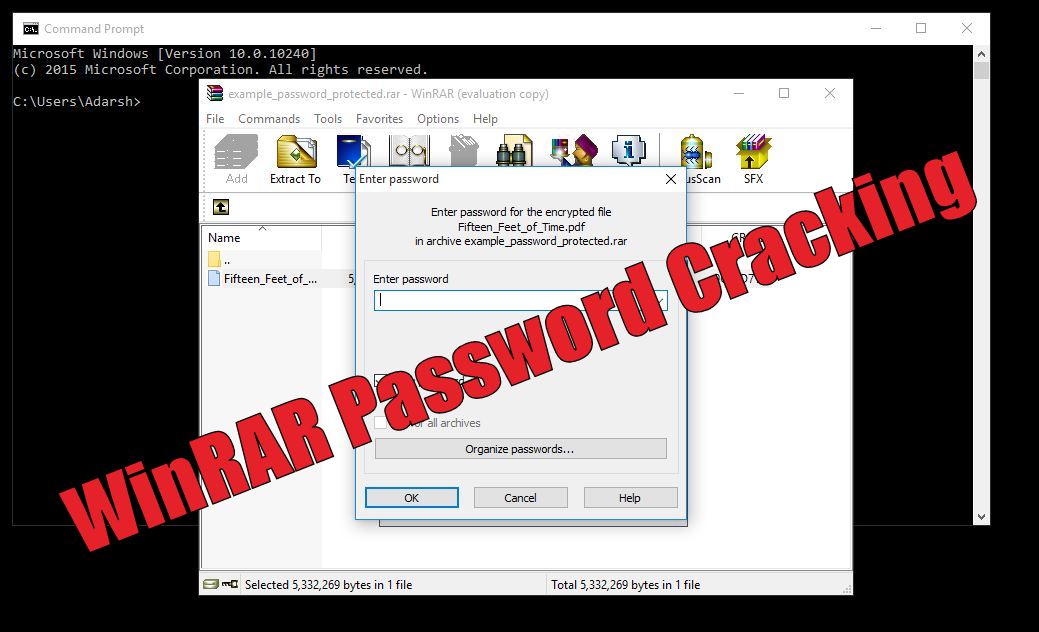
How to crack winrar protected password files

Losing/forgetting your WinRAR password could be a headache. So, here, I’m going to tell you this simple method of how to crack WinRAR password protected files. Take a look.
WinRAR is a great utility to compress your files and protect it using a password. You can keep your data safe and save storage space by keeping it compressed in .RAR format. However, what to do if you forget the password of your WinRAR password protected file?
To crack WinRAR password protected file password, you need to recover the WinRAR file password and use it to unlock the file. There are some methods to crack WinRAR password using the command prompt, but they just work on integers and other combinations of characters.
So, all you need is a 100% working method that cracks the WinRAR password. In this detailed tutorial, we’ll be using a simple password recovery tool to recover your lost/forgotten WinRAR file passwords.
You need to use the .RAR Password Genius to crack WinRAR password and .ZIP Password Genius to crack the WinZIP Password.
In the steps described ahead, I’ll describe how to crack WinRAR password. WinRAR Password Genius is a tiny but powerful password recovery tool that is famous for high speed and guessing the complex password algorithms. It supports all the software that create the .RAR archives.
Let’s get started:
To crack the WinRAR passwords, you need to download the WinRAR Password Genius from this link and install it on your PC. This software is the solution to all your worries and it works in three steps to complete the WinRAR password recovery.
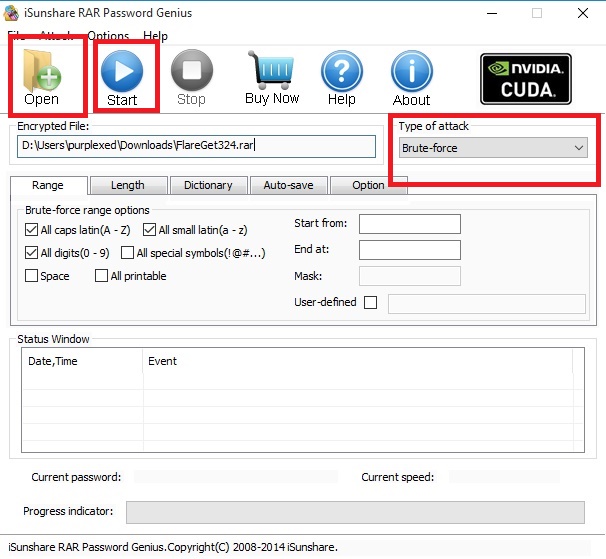
To start WinRAR recovery process, you need to fire-up the software and import the .RAR file into the WinRAR Password Genius. You can do this by hitting the Open button and look for the .RAR file on your computer to bring it in the Encrypted File box.
The software uses multiple attack techniques to crack the WinRAR password. Different kinds of attacks are Brute-force, Mask, Dictionary and Smart. These are used to guess different types of passwords and you need to use these methods accordingly.
Read more about these here to select the type and settings.Now after choosing the Type of attack from the drop-down list, select the attack type and crack WinRAR password by pressing the Start button.
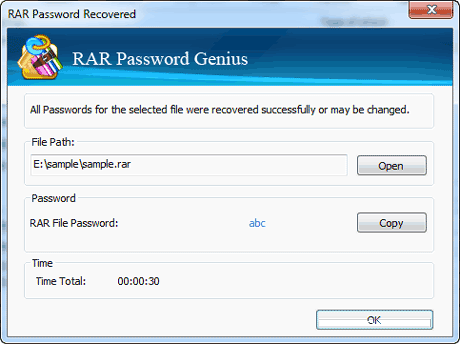
After this, the software will start its process and recover the WinRAR password for you. As the software cracks the file, a pop-up will appear showing you the password.
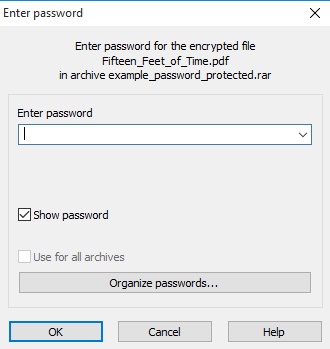
Now, open the password protected .RAR file in WinRAR and you’ll see a dialog that asks for the password. Now, enter the recovered password and hit enter. This will bypass the password and now you can access your files and extract them.
To crack the WinZIP password protected files, you need to use the WinZIP Password Genius.
Did you find this how crack WinRAR password protected file tutorial helpful? Tell us in the comments below.